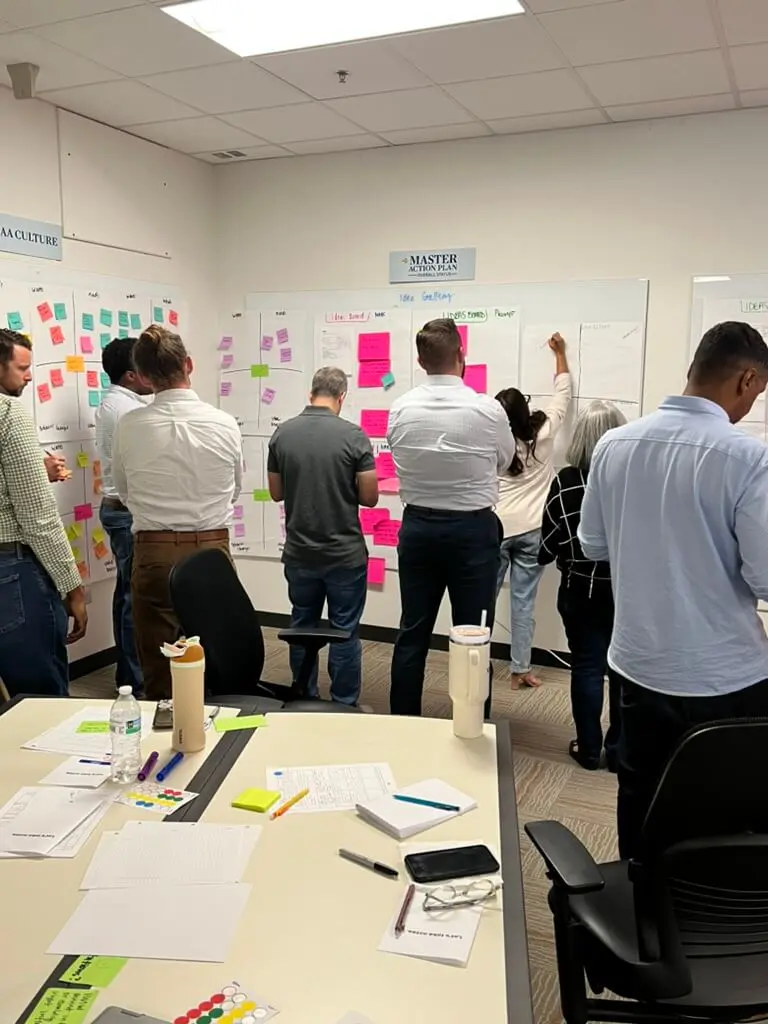
Human-Centered AI Consulting: 7 Steps to Real Adoption


Last updated: March 2026
“We have a dozen AI tools running across the company, and barely anyone touches them.”
That admission, from a real ops director at a mid-market firm, is more common than any vendor wants to acknowledge. The dashboards looked expensive. The automations looked impressive. Adoption hovered under fifteen percent.
Nobody said it out loud. But everyone knew the truth: the tools weren’t built for the people who had to rely on them.
Studies from MIT, McKinsey, and RAND put enterprise AI failure rates between 80–95%. The algorithm almost never fails. The humans around it do: unclear workflows, low trust, systems that don’t match how people actually work.
That’s the problem human-centered AI consulting was built to solve.
Why Does Enterprise AI Have an 80–95% Failure Rate?
The failure isn’t in the model. It’s in everything around it.
MIT’s 2025 research found that 95% of AI pilots that “worked” technically still failed to deliver value. The gap was almost always the same: workflows weren’t redesigned to support the new tools. S&P Global reports that nearly half of enterprise AI experiments never make it to production. WorkOS found that many organizations are running six or more competing AI initiatives at once, none of them aware of each other.
The result is predictable: confusion, duplicated work, shadow IT, and teams that distrust every AI output they see.
Here’s the pattern we keep running into: AI accelerates whatever system you already have, good or bad. If your workflows are messy, AI makes the mess move faster. If communication is unclear, AI amplifies the misunderstanding. Most leaders think they need more AI. What they actually need is better system design.
AI fails when the decision points are vague, when teams don’t understand how to interpret what the model produces, when governance is missing, and when nobody asked the people using the tool how they actually work. Human-centered AI consulting addresses all of this before a single line of code gets written.
What Human-Centered AI Consulting Actually Means
Human-centered AI consulting is an approach that designs AI systems around real user behavior, workflows, and decision-making, rather than chasing model accuracy or automation coverage alone.
Traditional AI consulting builds something technically impressive. Human-centered AI consulting builds something used. It treats the people running AI as collaborators, not edge cases. It asks what decisions they’re accountable for, where they get stuck, and what they already trust, then designs AI that fits that reality.
Instead of a black box, it creates systems people understand and can question. Instead of one-off pilots, it builds workflows that fit real-world constraints. Instead of dependency, it builds the capability for your team to run AI safely and extend it over time.
It’s less about the model. It’s more about the system around the model. This is what AI transformation consulting looks like when it’s done right — and it’s what separates organizations that build a functioning enterprise AI strategy from those that keep restarting the same pilot.
Human-Centered AI vs. Feature-Driven AI: What’s Different?
Most enterprise teams default to feature-driven AI. It’s the fastest way to show progress and the most reliable path to low adoption.
Feature-driven AI stacks isolated capabilities: a chatbot here, a report generator there, a sentiment tool nobody asked for. These features look good in demos. They rarely map to real workflows. People bypass them because they add cognitive load instead of removing friction.
Human-centered AI flips the question. Instead of “what AI can we add?” it asks “where is the stuck point in this process, and would AI actually help?” When AI lives inside the workflow rather than beside it, adoption stops being a change management problem and starts being a natural consequence of good design.
| Feature-Driven AI | Human-Centered AI | |
|---|---|---|
| Starting point | What can the model do? | Where do people get stuck? |
| Design input | Engineering requirements | User research + workflow mapping |
| Integration | Separate tool or dashboard | Embedded in existing systems |
| Adoption driver | Training and mandates | Fits how people already work |
| Failure mode | Impressive but unused | Rare, friction is designed out |
| Governance | Added later (if at all) | Built in from the start |
| Team outcome | Dependency on the tool | Capability to extend and question it |
The table above isn’t theoretical. Enterprise teams repeatedly roll out AI-powered dashboards nobody checks, customer service AI that agents skip because it slows down calls, and product features that never influence retention. That’s not a technology issue. It’s a design issue.
The 7 Steps to Building AI Systems People Actually Use
There’s a method behind the organizations that actually get this right. Here’s what it looks like in practice.
1. Strategy and alignment
Clarify the use case, the success metrics, and the operational constraints before anything is built. The most expensive mistake in enterprise AI isn’t building the wrong model. It’s building the right model for a problem nobody actually has. Align executives and practitioners early, because the gap between what leadership thinks AI will do and what frontline teams actually need is almost always wider than anyone expects.
2. Data and infrastructure readiness
Audit pipelines, data quality, governance, and access before you build. Without this step, AI outputs become unreliable fast. Once a team learns to distrust the model, rebuilding that trust takes longer than building it right the first time.
3. Prototyping and user testing
Test before you build at scale. Let real users work with rough versions. Watch where they pause, where they skip ahead, where they default to their old process anyway. Those moments are the design brief. No requirements document surfaces them as reliably as fifteen minutes of observation.
4. Design-system integration
AI should feel familiar. That means matching the interfaces, language, and component patterns your team already knows. If your ops team lives in Salesforce, the AI suggestions belong in Salesforce, not a separate dashboard they have to remember to check. When the tool shows up where people already are, adoption stops requiring a behavior change.
5. Governance and change management
Document how decisions get made, who can override the system, and how output quality is monitored. Explainability, accountability, fairness testing, privacy controls: these aren’t compliance checkboxes. They’re trust infrastructure. And trust drives adoption more reliably than any feature.
6. Training, enablement, and playbooks
AI is not set-it-and-forget-it. Teams need hands-on workshops, clear playbooks, and context-aware guidance that shows how to use, question, and challenge AI safely. The best enablement leaves teams with artifacts they can reuse and extend. At Cabin, we’ve found that role-specific playbooks, written with the people who’ll actually use them, make the difference between a tool that gets opened and one that gets ignored. Not a slide deck that lives in a folder nobody opens.
7. Phased deployment and optimization
Roll out gradually. Measure adoption, not just accuracy. Improve the system without disrupting operations. The goal isn’t a perfect launch. It’s a system that keeps getting better because the people using it are actually using it.
What This Looks Like in Practice: Two Real Examples
Example 1: Service Cloud backlog reduction
A global support organization was drowning in unresolved tickets. Tools were scattered across teams. Agents didn’t trust the previous AI routing system, with good reason, since it had misfired often enough to become a punchline.
The fix wasn’t a better model. It was workflow mapping first, a prototype built inside existing Salesforce processes second, and role-specific playbooks third. Agents learned how the system made decisions and how to override it when something felt off.
Within the first quarter: backlog dropped 37%, agent satisfaction rose, and new agents reached full productivity two weeks faster than before. The difference wasn’t the algorithm. It was the design and enablement wrapped around it.
Example 2: Early cancer detection
A health system improved early cancer detection rates by 15% by pairing AI triage with clinician oversight and transparent confidence scores. Every AI recommendation showed its reasoning. Clinicians could accept, adjust, or escalate with a single action.
Adoption accelerated because clinicians felt supported, not replaced. The escape hatch, the ability to override without penalty, turned out to be the feature that made everything else stick. It is also the number we watch most closely afterward, for reasons covered in responsible AI consulting.
When to Bring in Outside Help – and When Not To
Most organizations come to us after something starts to break. Either pilots have stacked up without ever reaching production, adoption is embarrassingly low, or compliance teams are nervous about AI systems nobody can explain.
External help makes sense when:
- Internal teams are stretched across too many disjointed pilots
- Workflows feel patched together rather than designed
- Adoption is low or wildly inconsistent across teams
- Governance isn’t established and risk teams are asking hard questions
- Leadership can’t see a clear line between AI investment and business value
- You need measurable progress within a quarter, not a year
Internal capability-building works better when:
- You have the bandwidth to train teams properly
- AI maturity is already established and you’re in optimization mode
- Long-term ownership is the priority and you have the technical staff to execute
The honest answer is that most organizations need both: external structure and methodology to get momentum, internal ownership to sustain it. That’s what the team enablement model we use at Cabin is built around. By month three, your team runs the playbook we built together.
If you’re evaluating whether to reduce consultant dependency over time, that’s the right instinct. The goal of any AI engagement should be a team that can extend the system without us, not one that needs us on retainer to keep it running.
Frequently Asked Questions
What is human-centered AI consulting?
Human-centered AI consulting designs AI systems around real user behavior, workflows, and decision-making rather than optimizing for automation coverage or model accuracy alone. It starts with the people who use AI: their routines, frustrations, and the decisions they’re accountable for, then builds systems that fit that reality.
Why do most enterprise AI projects fail?
Most failures trace back to low adoption, unclear workflows, missing governance, and poor alignment between what was built and how people actually work, not model quality. MIT research found 95% of technically successful AI pilots still failed to deliver business value.
How can you tell if an AI system is truly human-centered?
Look for user research before any model is built, explainability built into outputs, and AI integrated into existing workflows rather than bolted on beside them. Also look for real override paths: can a user pause, question, or escalate without fear of breaking something? If the answer is no, it wasn’t designed for them. It was designed around them.
Does human-centered AI slow down delivery?
It speeds up the path to production by surfacing friction points early, before they become expensive rework. The engagements that skip this step tend to produce technically successful pilots that never get used. Fixing that after the fact costs more than doing it right the first time.
What’s the difference between AI adoption and AI implementation?
Implementation is getting the model running. Adoption is getting people to rely on it. Most digital transformation efforts over-invest in implementation and under-invest in the workflow design, training, and trust-building that drives actual use. That’s why so many technically successful projects don’t show up in the numbers.
Most organizations we talk to aren’t behind on AI. They’re stuck. Pilots that worked technically but never reached production. Tools that got built but not adopted. Teams that can’t explain what the AI is doing or why.
If that’s where you are, let’s map your next 90 days. You’ll leave with a clear picture of where the friction is, which workflows are worth automating, and what your team needs to own it after we’re gone.
About the Author
Cabin is an AI transformation consultancy that architects AI-native products, implements intelligent systems, and builds client team capability while doing it. Founded by the core team behind Skookum, which became Method under GlobalLogic and rolled up to Hitachi, Cabin’s partners have shipped 40+ enterprise products together over nearly 20 years, for clients including FICO, American Airlines, First Horizon, Mastercard, Trane Technologies, and SageSure.
Human-centered AI consulting is where Cabin operates every day, not as an advisor watching from the sidelines, but as the senior strategists, designers, and engineers doing the work. The team has navigated enterprise AI engagements across financial services, healthcare, and insurance, building systems that ship in weeks and capability that stays after the engagement ends.
Everything Cabin publishes on AI consulting, AI-native product design, and team enablement comes from work currently in progress, not from research reports or conference decks. When we write about what goes wrong with enterprise AI projects, it’s because we’ve inherited the aftermath. When we write about what good adoption looks like, it’s because we’ve built the playbooks.